Set up AIWG without copying every skill into my tool's folders, keep my workers working after updates, and search the full text of my larger files.
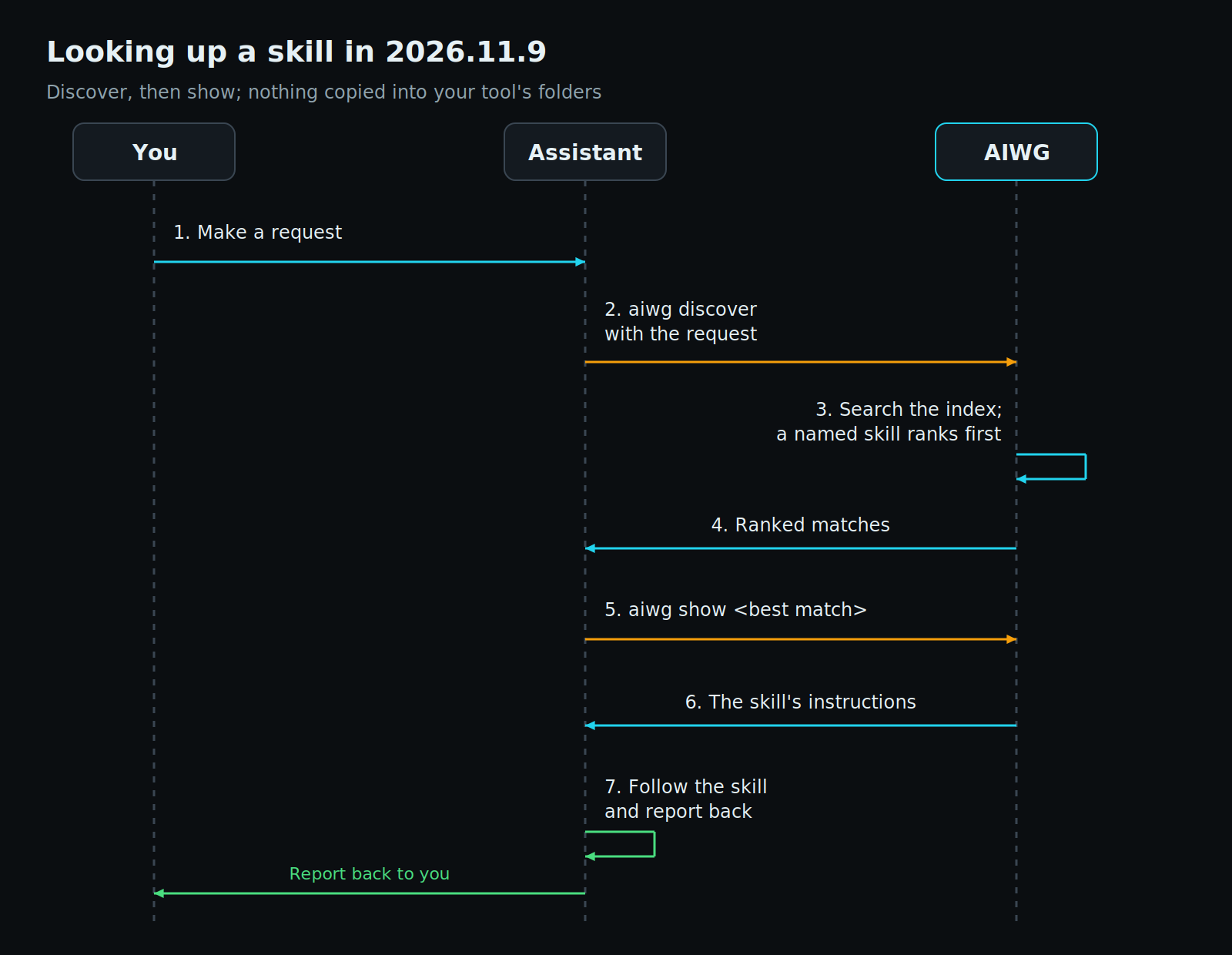
AIWG already lets your assistant look up its skills, agents and commands with aiwg discover and read one with aiwg show. In 2026.11.9, that lookup becomes the normal way you set up bundles, and copying them into your AI tool's folders becomes something you ask for. The release also carries existing Windsurf support forward under the Devin name. The writing checker can confirm some patterns by meaning, so it catches matching sentence shapes even when the words differ. Several worker tools keep working as they update, and full-text search now covers large files.
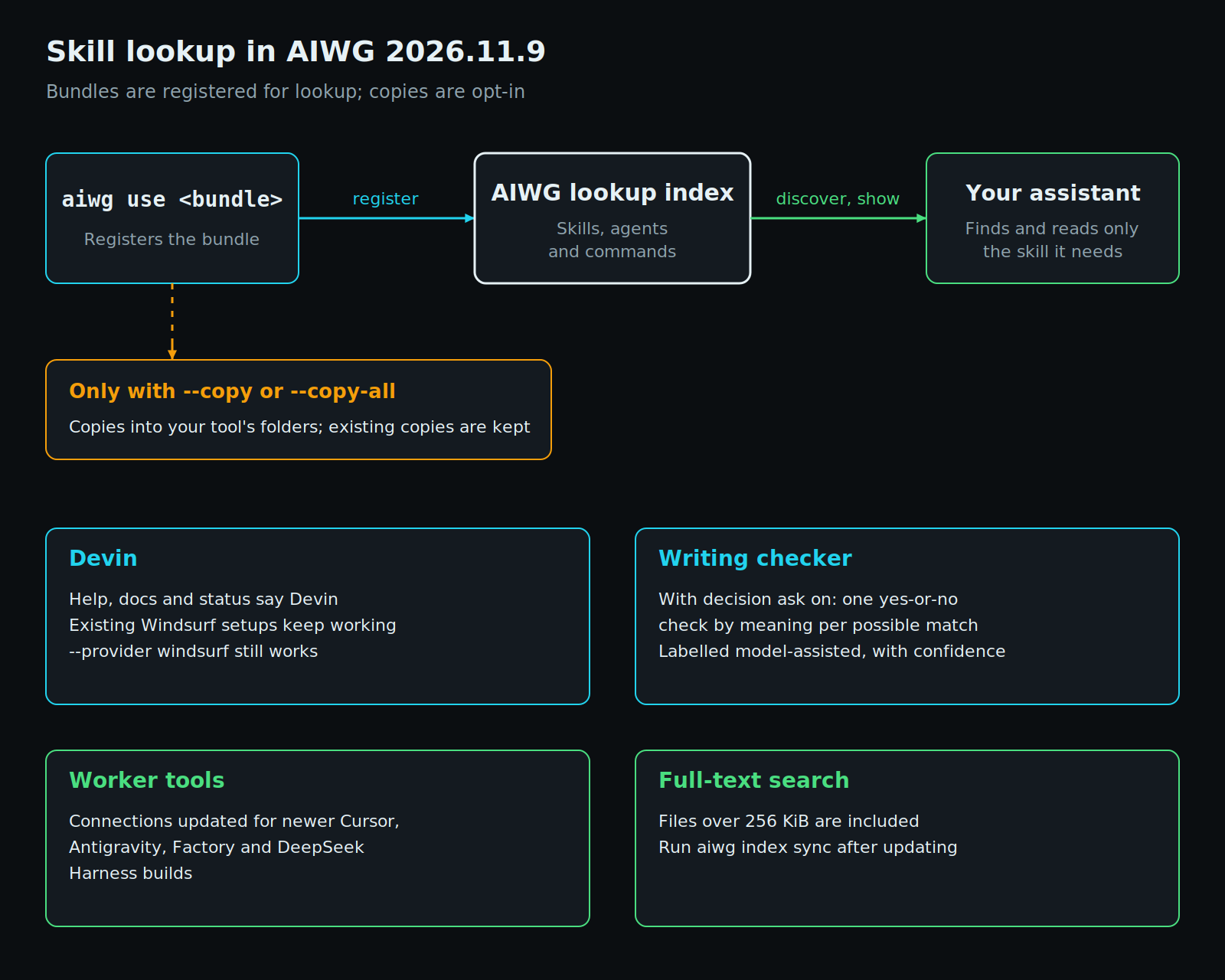
Set up bundles for lookup, and copy only when you ask
Make the SDLC framework available for lookup, and only copy it into my tool's folders if I ask.
Until now, aiwg use copied every skill, agent and command in a bundle into your tool's folders. Now it registers the bundle so your assistant can find what it needs with aiwg discover and read it with aiwg show. Your tool's folders stay small, and your assistant has fewer copied skill listings to load before it starts on your request.
When you do want copies, add --copy, for example aiwg use sdlc --copy, or --copy-all for everything. Updating does not delete copies you already have. To see what removing them would change, run aiwg remove <bundle> --dry-run first. The safety rules that come with AIWG's extensions are still delivered when you set up for lookup only.
Discovery also ranks the skill you name first, even in long requests with typos and for skills that live in your project.
Keep using Windsurf, now under the Devin name
Refresh AIWG for Devin and keep my existing Windsurf setup working.
AIWG already supported Windsurf. Its help, docs and status now say Devin or Devin Desktop, and devin is the name to use when you choose the tool in a new setup. Existing Windsurf setups keep working. AIWG still recognizes them, still writes the folders Devin Desktop reads today, and still accepts the older --provider windsurf name.
Check writing patterns by meaning
Check whether this draft repeats the same sentence structure even when the words are different.
The writing checker already used rules to find patterns such as stock contrasts and repeated sentence shapes. If you turn on decision ask, the checker can send a possible match to AIWG's existing decision engine for a single yes-or-no judgment about its meaning. That helps it confirm patterns that rules alone miss, such as paired statements with matching structure, a colon that sets up a reveal, or three fragments in a row. These findings are labelled model-assisted and show their confidence. With decision ask off, the checker works as before.
Keep handing work to your worker tools
Check my workers, then give this coding task to the tool I have set up for it.
AIWG already hands tasks to worker tools such as Codex, Muse and Cursor. Those tools change often, and this release keeps several connections working:
- Cursor workers stay usable after cursor-agent updates itself. A Cursor build newer than the ones AIWG has checked shows a warning with the command to check it again.
- Antigravity workers work with its updated model names and message format.
- Factory workers recognize when droid 1.0.0 finishes a task.
- DeepSeek Harness workers apply the matching permission preset, and can use OpenRouter if you opt in.
- Grok Build gets AIWG agents in its own agent folder when you add
--copy.
Search the full text of large files
Search the full text of my larger files, including the ones the index used to skip.
Full-text search already worked across your project index, but the default search backend skipped files larger than 256 KiB. It now stores their full text. After updating, run aiwg index sync so your existing index picks up those files.
Fewer setup surprises
Refresh AIWG in this project and tell me whether my setup is current.
aiwg statuschecks whether your deployments are out of date compared with the AIWG version you are running, and lists every tool you have configured, including Muse.aiwg refreshmarks current managed agents and commands with the running version.- On Windows, setup checks and refresh work when Node is installed in a folder with spaces, such as
C:\Program Files\nodejs.
Update and refresh
Update AIWG, refresh it for my tools, and resync my search index.
After updating AIWG, refresh each project and resync the index if you use full-text search:
aiwg refresh
aiwg index sync
Projects you set up before this release keep their copies. New aiwg use runs set bundles up for lookup unless you add --copy. The full CHANGELOG lists every change.