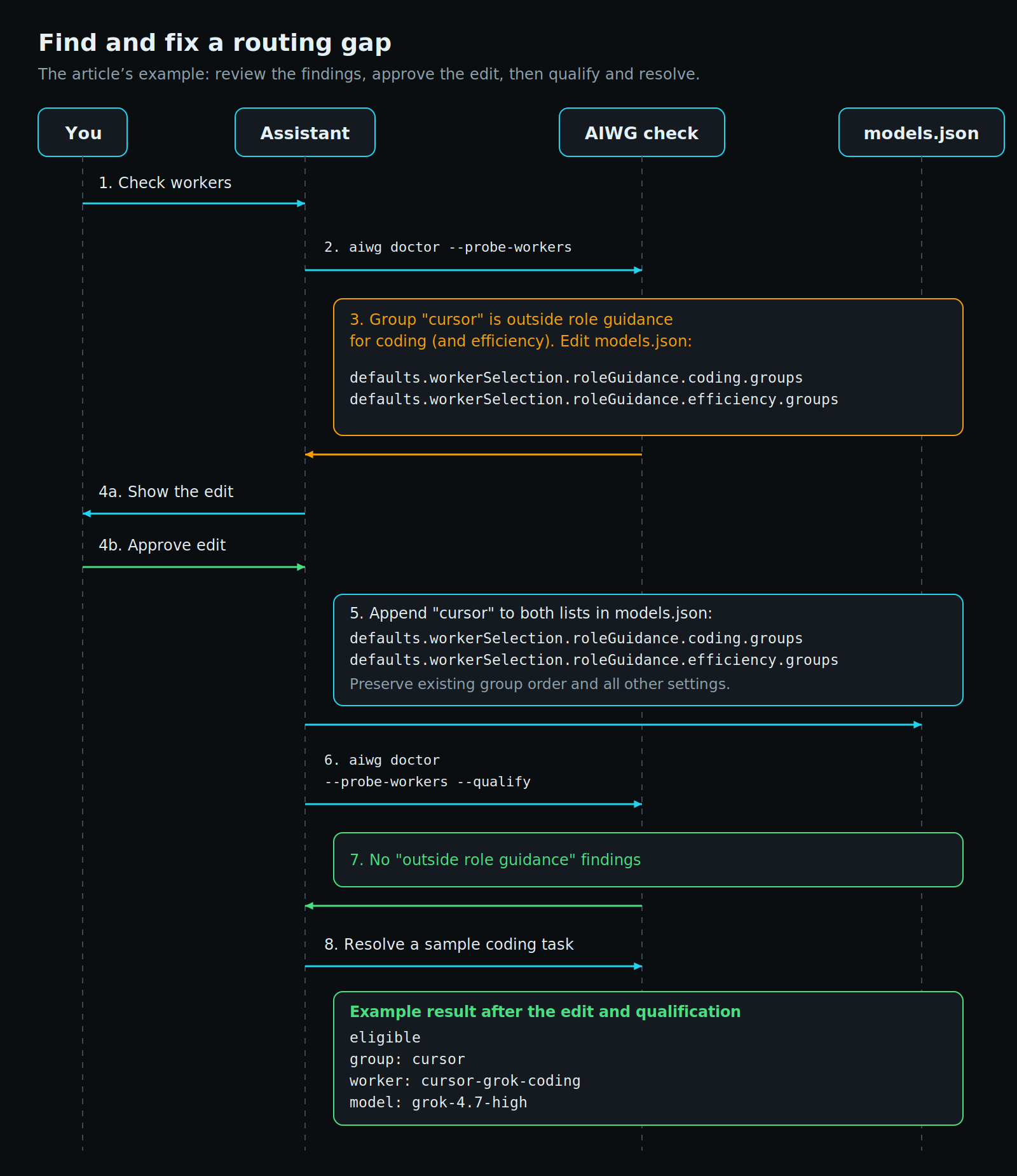
Check my worker setup before handing work off. Show me the findings, fix any missing role-guidance entries for my configured Cursor group, and re-check with qualification. Tell me what still needs attention.
This how-to follows a real worker check on AIWG 2026.11.8. It found a group named cursor missing from the settings that allow it to handle coding and efficiency tasks. You'll make the edit named in the finding, then run the qualification check.
AIWG already hands work to Codex, Muse and Cursor workers. Before you hand work off, the worker health check (added in 2026.11.8) flags setup mistakes: groups missing from role guidance, configured tools no group uses, and qualifications that went stale after a configuration change. AIWG checks the Cursor version before it uses Cursor as a worker.
Before you start
Explain how workers, worker groups and role guidance fit together in this project. Check that worker dispatch is enabled and workers are configured before we follow this example.
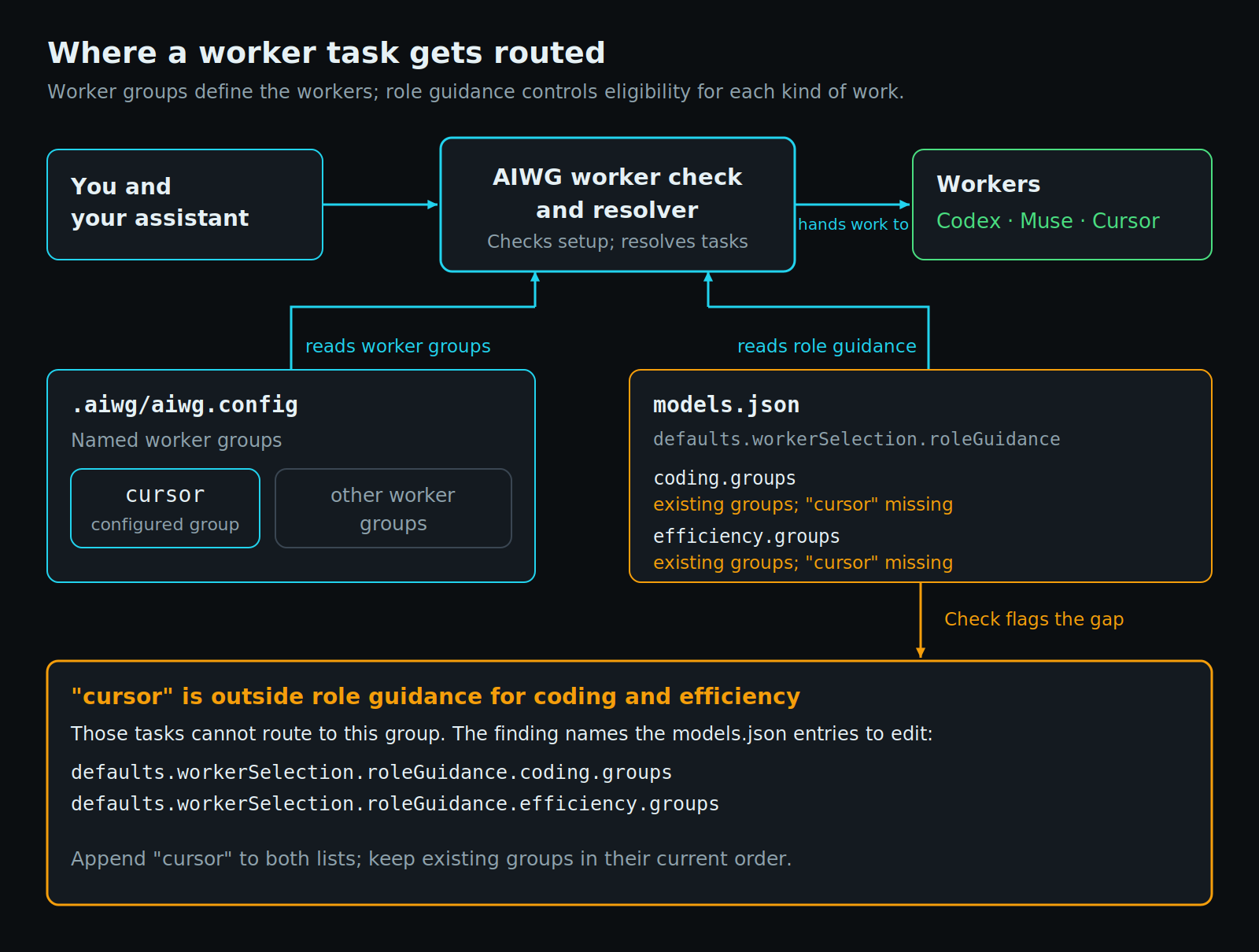
A worker is a separate AI session your assistant gives a task to. A worker group is a named set of workers with shared limits and rules for how they run.
Role guidance tells AIWG which groups are eligible for a kind of work. For example, coding covers implementation, while efficiency covers inventory and other bounded simple tasks.
Use an existing project with AIWG 2026.11.8, worker dispatch enabled and workers configured. Run the commands below from the project root. If you still need to set up dispatch, start with the worker dispatch guide.
1. Run the worker check
Run
aiwg doctor --probe-workersin this project. Show me the worker findings and the changes they recommend before editing anything.
For a terminal run:
aiwg doctor --probe-workers
The probes run the configured worker tools with their version arguments. A version check alone does not qualify a worker for real tasks, so read both the routing findings and the installation notes.
2. Read the missing-group finding
Explain the findings about the
cursorgroup. Tell me which roles are affected and point to the exact settings the check names.
These are the relevant lines from the real capture, quoted verbatim:
  ⚠ Worker Policy: OG_CONFIG_REFERENCE /defaults/workerSelection/roleGuidance/coding/groups: Group "cursor" is outside role guidance for coding. Edit models.json: add "cursor" to defaults.workerSelection.roleGuidance.coding.groups.
  ⚠ Worker Policy: OG_CONFIG_REFERENCE /defaults/workerSelection/roleGuidance/efficiency/groups: Group "cursor" is outside role guidance for efficiency. Edit models.json: add "cursor" to defaults.workerSelection.roleGuidance.efficiency.groups.
Here cursor is the name of your worker group. It is missing from the eligible-group lists for both coding and efficiency, so AIWG will not send those kinds of tasks to it. The finding names the file and both entries to change.
If your output names a different group or setting, follow that finding. Apply the edit below when your configured cursor group has this same gap.
3. Add the group to role guidance
In the project-root
models.json, append"cursor"todefaults.workerSelection.roleGuidance.coding.groupsanddefaults.workerSelection.roleGuidance.efficiency.groupsif it is missing. Preserve the existing group order, other entries and all other settings. Show me the diff.
Open models.json at the project root. Under defaults, then workerSelection, then roleGuidance, make these two changes:
| Entry | Edit |
|---|---|
coding.groups |
Append the string "cursor" to the existing array. |
efficiency.groups |
Append the string "cursor" to the existing array. |
Keep the groups already listed, in their current order. A task can only be routed to a group that is on the list for its kind of work. The worker groups themselves live in .aiwg/aiwg.config; role guidance belongs in the project-root models.json. Edit that file directly for this fix.
The capture then shows the fix that was applied and the command to run next:
Fix applied: add "cursor" to defaults.workerSelection.roleGuidance.coding.groups and .efficiency.groups in models.json, then run: aiwg doctor --probe-workers --qualify
4. Re-check with qualification
Run
aiwg doctor --probe-workers --qualifyfrom this project root to qualify the configured workers. Confirm whether the two missing-group findings are gone, and explain any remaining blockers before handing work off.
For a terminal run:
aiwg doctor --probe-workers --qualify
Qualification runs a short check with each configured worker tool and records its approval. AIWG still checks each real task before it launches a worker.
To confirm the fix, ask your assistant to check whether the finding is gone and to send a sample coding task to the cursor group:
Run the worker check again and tell me whether any "outside role guidance" finding remains. Then resolve a sample coding task for the
cursorgroup and show which worker and model AIWG would use.
On the setup this example comes from, after the edit and qualification, the check reported no "outside role guidance" findings. A sample coding task then resolved as eligible for the cursor group, using its cursor-grok-coding worker on the grok-4.7-high model.
The check also prints informational notes marked ○, such as a model's output limit not being reported. On this setup those notes did not stop the sample task from resolving. Read lines marked ✗ and ⚠ first.
When you have a real task, have your assistant resolve it against the current setup before it hands the work off. The worker dispatch guide covers qualification and checking which roles a task needs.